
Oops!
The page you are looking for has not been found or no longer exists.
What are bulk upload Evaluator links?
To help business partners to save time creating volumes of single-use Evaluator links, we have extended the creation of Evaluator links by adding a feature to duplicate an existing ‘single use’ Evaluator link.
For this process, we will be using an existing Single use questionnaire (links allowed are set to 1) and not a multi-link Evaluator link.
What’s the difference between single-use and multi-link Evaluator links?
- Single-use links can only be used only once and enable you to track if it has been completed by the recipient (links are set to 1). This takes longer e.g. if you have 100, traditionally, it can take hours to enter each one. The link can only be completed by 1 individual, after which, it will be closed and cannot be used again.
- Multi-link Evaluator link is a single link that allows more than 1 recipient to complete the Evaluator e.g. 75. This takes about a minute to create and the link ‘Code‘ is the same. So, the link can be completed by anyone with access to it. You can get a list of the recipients that have completed the link by email, but you will not know who has not completed it.
How to upload bulk Evaluator links?:
Ensure you have created a client and added a logo (if required). If the client already exists, continue.
If you already have a single Evaluator link that is not completed, you can use that link to duplicate the values for each recipient.
- Create a new single-use Evaluator (or you can use an existing one – the client and profile type and profile template will be used from the selected link).
- Click on the Repeat link button
- Paste the list of recipient’s names and email addresses in the popup window
- Click Continue
- Once completed, do a transitory check to ensure all links are ok
- You can then send the links by selecting each one, then ‘Update selected’, and setting the Send Link to Yes. at once.
Watch how to video
How to Turn On Automatic Publishing?
By default, your account will be set up to automatically publish profiles once a candidate has submitted an Evaluator. You can change this from your account.
To Turn off Auto Publish:
- After the login, on the landing page, scroll down to settings options (blue ones), and click on the ‘Manage Publishing Settings‘ link.
- From the Edit page, in the ‘Auto Publish’ drop-down field, Select ‘No’.
- Then click the save button.
To Turn On Publish:
- After the login, on the landing page, scroll down to settings options (blue ones), and click on the ‘Manage Publishing Settings‘ link.
- From the Edit page, in the ‘Auto Publish’ drop-down field, Select ‘Yes’.
- Then click the save button.
* Note: This setting applies to all Profiles that are queued for publishing after the change has been made. If you turn off auto-publish, you will need to login to the color persona agent portal and manually publish each profile, from the manage profile publishing menu option.
You can however, override this setting and set new publishing settings at the Client level. This feature is available in the Advanced account only.
How to Delete Unpublished Candidate records from my account?
If the candidates profile report has already been published, then you cannot delete the candidates record. You can however, perform housekeeping to remove unwanted processed data from the system.
You can delete all candidate related records for a single candidate from your account(as if the candidate had never completed the Evaluator), only if the profile report has not been published.
If you want to employ this type of process flow, e.g. manually publish selected completed profiles for each candidate, then you need to Turn off Auto Publish from your account settings (see FAQ).
Note: If the auto publish is turned On, then you cannot intercept the candidate record and prevent it from being published.
The advanced configuration page allows the Agent to Switch on or off options in the profile report or Evaluator. This is a single page that allows a number of values to be configured to enable or disable functionality.
You are required to either enter Y to enable the described functionality, or you may be required to enter a numeric value or a text value such as URL or Footer text etc.
The options are only configurable and available to Advanced Agent account holders.
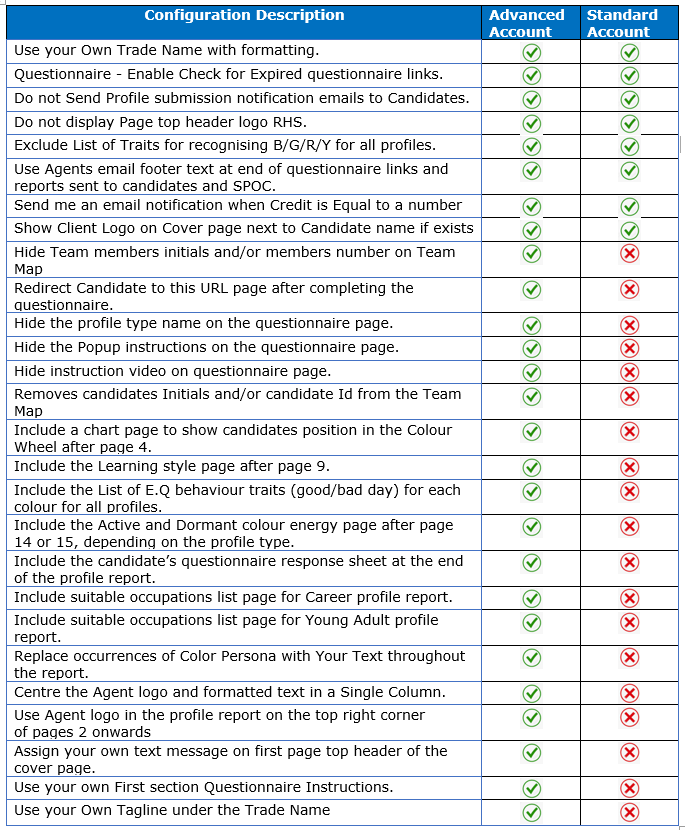
Standard & Advanced Configuration
The advanced Features have a page designed for individual each feature and there are a number of them (listed n the table below), The features allow the Agent flexibility to select options to allow enable features such as overriding fonts, logos, publishing settings at either, user level, client level and or profile and client level.
You are required to make the relevant selection of values from drop downs or enter a value, in doing so the profile publishing engine will pick these advanced feature settings and act upon them accordingly.
The advanced features are available to Advanced Agent account holders only.
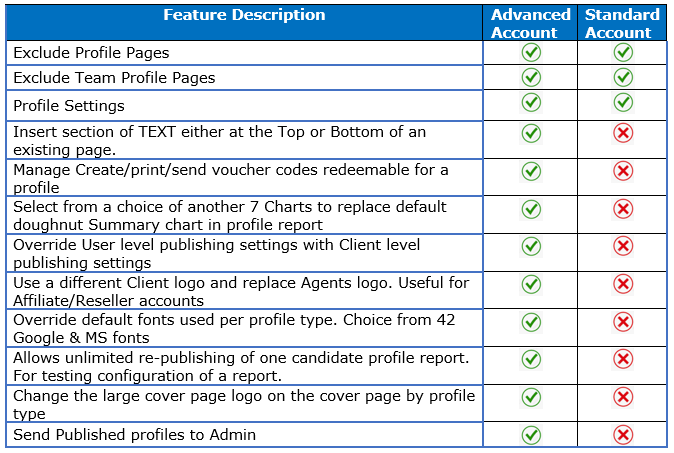
Advanced Features

Selecting Gender during the Profile Evaluator
During the process of Individuals completing the profile Evaluator (questionnaire), they will have to select one of the following Genders:
- Female
- Male
- Neutral
- Other
This means:
If a Male or Female is selected, the reports are personalised to the individual completing the questionnaire. The usage of terms such as ‘Himself’, ‘Herself’,’ ‘He’, ‘She’ etc and also include the candidate’s name. Doing this makes the report easier to read and focuses on the individual rather than the report being generic.
if Neutral or Other is selected, the reports are still personalised to the individual, but the usage of pronouns such as ‘Himself’, ‘Herself’,’ ‘He’, and ‘She’ are NOT used. Doing this makes the reports gender-neutral.
Gender is a topical subject and the majority of people do not have any issues when selecting the ‘Gender’, however, in some cases where Gender becomes questionable, we would suggest one of the following approaches:
- Normally, a candidate should select the gender they were born into and comfortable with to use in the reports (Male or Female).
- The candidate could select a Gender that ‘they‘ prefer they are and would like to be recognised (or seen) as in the report (Male or Female).
- Select Neutral or Other if the individual feels that the first two options are not suitable for them.
Profile report has the Wrong Gender!
From time to time a candidate selects the wrong Gender when completing the personal details page of the Evaluator. Since Color Persona profile reports are Gender specific e.g. uses ‘He or She’, ‘herself or Himself’ throughout the report, a report with an incorrect Gender will ‘read’ totally wrong to the candidate.
This does happen now and then, but not to worry, as its simple to rectify.
How to Change incorrect Gender in profile reports
When a candidate has selected the wrong Gender in the report, the report will read wrongly and needs to be rectified. This is how you can change the Gender to the correct one and republish the report:
Edit the Candidate record First
- Login to www.colorpersona.com/profiling
- From my Candidates menu, select the Candidates option
- Edit Candidate’s record – click the ‘Edit pencil’ link from the list on the left-hand side
- In the Gender drop-down, change and select the correct Gender and Click Save button.
Then Re-Publish the profile report
- From the ‘Candidates profile’ menu, select ‘Profile publishing’ option
- From the list of profile record, against the affected candidate’s profile record, Click the ‘Re-Publish’ button which is on the rightmost column.
That’s it. The profile report will be republished on the next cycle when the Publishing engine runs. A new version of the report will be automatically sent to you if you have set the Send to Me(Agent) to Yes in your Agent account.
List of Default Fonts used
A list of default fonts used by each profile type. These can be overridden by the available fonts. You can select a different font for each profile type:
The default fonts used by profiles are:
| Profile Type | Default Font |
|---|---|
| Career H.R Recruiter Executive Young Adult Candidate 360 Feedback Team Team Feedback |
Varela Round Century Gothic VAG Rounded Light Tahoma Ubuntu Century Gothic Oxygen Montserrat |
Available Fonts
The Fonts listed below (78+) are available to be used for different profile types, from time to time, we will add additional fonts as requested by our business partners. Once you select a font for a particular profile type, the font will be applied to all reports for the selected profile type:
| Font Type | Font Type |
|---|---|
| Adobe Caslon Pro Adobe Devanagari Adobe Garamond Pro Arial Assistant Baskerville Old Face Book Antiqua Bookman Old Style Cabin Calibri Calisto MT Cambria Cardo Century Century Gothic Century Schoolbook ChaparralPro Comfortaa Comic Sans MS Constantia Courier New DM Sans Dosis EB Garamond Fira Sans Light Futura Bk BT Garamond Gayathri Georgia GFS Didot Gill Sans MT Helvetica Hind Siliguri IBM Plex Sans Josefin Sans Kanit Karla Lato Libre Franklin |
Lucida Bright Manjari Martel Maven Pro Merriweather Minion Pro Montserrat Montserrat Alternates Muli NanumGothic Noto Sans Noto Serif Nunito Old Standard TT Open Sans Oxygen Palatino Poppins Prompt PT Mono PT Serif Questrial Quicksand Raleway Red Hat Text Roboto Rubik Segoe UI Source Sans Pro Tahoma Times New Roman Trebuchet MS Ubuntu Univers 45 Light VAGRounded-Light Varela Round Verdana Vollkorn Work Sans |
Recommended Fonts
For advanced account holders, we recommend the fonts listed below, theses have been tested and prove to be high quality for printing and viewing as PDF documents.
| Recommended Font Type |
|---|
| Adobe_Garamond_Pro Arial Bookman_Old_Style Calibri Century_Gothic Constantia Gill_Sans_MT Helvetica Minion_Pro Montserrat Noto_Serif Open_Sans Oxygen Questrial Quicksand Roboto_Slab Source_Sans_Pro Tahoma Times_New_Roman Trebuchet_MS Ubuntu VAG_Rounded_Light Varela_Round Verdana |
How to Change profile fonts – (Advanced Agent Account is required)
To change the default profile fonts used per Profile type do the following:
- Login to the Color Persona Agent portal
- Navigate to the Advanced feature menu option from the ‘My Account‘ menu option, then select the Advanced Features option
- Then select the User Profile Fonts option
- Click on the ‘Add New’ button
- From the Profile type drop-down, select the Profile for which you wish to change the font type for
- From the Font Name drop down, then select the New Font type you want to use for this profile type (You can view the sample Fonts by viewing the Sample PDF below)
- You can change the font sizes for different items. If your not sure leave them as is.
** Note:
Making a change to font sizes can cause the page content to overflow to next page or cause a blank page within the report. If the syntax is changed, the font may fail to be utilised and a system default font will be used or even break the publishing process for that profile type.
View Sample Fonts in PDF document
The PDF document will give you an idea of what the font looks like within a Page of a report.
Click to download Sample Font Document


It is difficult to conclusively define someone’s Personality but answering some basic questions can get you closer to understanding your own personality type, such as:
- What do you like and dislike?
- What are your habits?
- How do you make decisions?
- How do you learn and process information?
- How do you interact with others?
- Understand your leadership & LEarning style
The answers to the above questions will bring you closer to discovering yourself and your personality.
Types of Personality Traits
Personality traits are diverse. An individual is unique and its the combination of various inherrent factors which contribute to one’s individualism.
When we refer to personality traits that make a person what he is, we are usually looking at:
- Our Behaviours
- Our Actions
- Our Attitudes
Positive & Negative Personality Traits
Personality trait attributes can either be a Positive or Negative, here is a short sample list of both.
Sample Positive personality “traits”:
- Adventurous
- Affable
- Conscientious
- Cultured
- Dependable
- Discreet
- Fair
Sample Negative personality “traits”:
- Laziness
- Picky
- Sullen
- Pompous
- Dishonesty
- Sarcastic
- Arrogant
Characteristics can also be considered as “Personality Traits” if you practice them habitually.
Determining Personality Types
Color Persona determines your personality traits by asking you to complete a questionnaire about your likes, dislikes and preferences. Please note that this is not a test. Color Persona will then create a customised personality profile report for you based on your responses.
Behavioural science and personality researchers have discovered that our myriad personality traits fit into five dimensions and they are:
- Openness: being receptive, keen and eager to learn and do new things. Such individuals are known to be insightful and imaginative and have a wide variety of interests.
- Conscientiousness: being reliable and prompt, organised, methodical and thorough.
- Extraversion: involves outgoing behaviour, being energetic and enjoys socialising with friends and colleagues.
- Agreeableness: applies to those who are friendly, cooperative and caring about others and their feelings. Less agreeable individuals would be distant and aloof.
- Neuroticism: refers to those who worry a lot and are also susceptible to being taken advantage of.
Our Color Persona Personality Profile Reports discuss in depth, an individual’s traits within the five dimensions and provide suggestions in areas for improvement.
What governs my personality?
Your personality is shaped by you, based on the actions and decisions you take. An individual can either be calm or anxious, diligent or passive. In order to effect a change to your personality, you need to understand yourself, your strengths and shortfalls, and then take some conscious and active steps to become the person you want to be.
What Are The Uses and Benefits Of the Profile Report?
There are different types of profile reports you may select to buy, as each report varies in focus and is intended for different purposes. The benefits and uses are identified by the correlating report sections as mentioned below.
- See Color Persona Profile reports.
- What are the Branding for the Profile reports I can Add?
- What Can I use the Profile reports for?
- What does the Team Profile report offer?
System Restrictions
The following restrictions apply when using the system.
- Must be 18+ for Agent accounts
- As An agent, you are responsible for keeping the Candidates information up-to-date.
- An agent is responsible for the security of the his/her candidate information. You get authorisation fro the candidate before you share the information to third parties.
- other restriction s and limitations in Our Terms & Privacy
EXTRAVERT
Extraversion or extrovert behaviour is a preference to focus on the world outside the self. Extroverts enjoy social interactions and tend to be enthusiastic, verbal, assertive, and animated. They enjoy large social gatherings, such as parties and any kind of group activity. Extraverts are likely to enjoy time spent with people and find themselves energized by social interaction.
Individuals possessing this personality type are active, informal, lively, sociable, practical, appear affectionate and are good conversationalists. They are habitually outgoing, venturing forth with confidence into the unknown. They appear full of energy and tend to involve themselves in a variety of pursuits. They prefer outdoor activities, relish social life and participate in many activities as they are energized by interacting with friends and strangers alike. They are generally good leaders, and they live in the present, concentrating on current activity. These individuals adapt easily to a given situation and their behavior is largely influenced by the dynamic energy of their outside world, as they react to the here and now, and do not tend to worry about what is around the corner, or brood about the future. Extroverts enjoy social situations and even seek them out since they enjoy being around people. Their ability to make small talk makes them appear to be more socially adept.
Extroverts are great at thinking on their feet and relatively comfortable with conflict. They enjoy stimulating environments that provide them with frequent opportunities to see and speak with others. When they are in a quiet environment, they will be prone to boredom and restlessness. Most people believe that an extrovert is a person who is friendly and outgoing. While true to an extent, a more accurate description of an extrovert is a person who is energized by being around other people. They find that their energy is sapped when they spend too much time alone and they recharge by being social. This is what makes them tick and leads extroverts to generally seek socialization, constant interaction, novelty and adventure.
When given the chance, an extrovert will engage in conversation with someone else, even a stranger rather than sit alone and engage in deep thought. In fact, extroverts tend to think as they speak, and very often think best when they are talking. Concepts just don’t seem real to them unless they can talk about them; simply reflecting on them is not enough.
AMBIVERT
The lesser known personality type “ambivert” is a good balance between introversion and extroversion, one that falls in the middle of the introverted-extroverted spectrum. While the extroverts are brash, outgoing and impulsive and the introverts being introspective, quiet and reserved; “ambiversion” describes people who display both extrovert and introvert tendencies depending on the situation. In many ways, Ambiverts have the best of both worlds, and are able to tap into the strengths of both introverts and extroverts as needed.
Ambiverts move between being social or being solitary, speaking up or listening carefully, with greater ease than either extroverts or introverts. They have a wider range of skills and can connect with a wider range of people. On the spectrum of social interaction, they sit right in between the introverts and extroverts. They love interacting with people, but in a very purposeful way. Excessive socialization tires them. Ambiverts are also very capable of doing things alone, but spending an entire day alone can cause them to be depressed and restless. Ambiverts can have extremely animated and interactive conversations, or mellow and meditative ones. Ambiverts will defend both their personal time as well as their social time. They act like extroverts in social situations and introverts when alone. Ambiverts recharge their energy levels with a mixture of social interaction and alone time. As a result, they have a more balanced, or nuanced personalities.
Ambiverts need time and space to process things on their own, but they also need people who they can trust to process things with externally. In order for Ambiverts to fully process information, they usually need both. Ambiverts seek breadth of knowledge and influence, but dive deep when they are truly passionate about a subject. They can be thought-oriented or action-oriented, depending on the situation, but they are also often both. As such they tend to do well, adapting to any situation that they are placed in. Ambiverts know when to be outgoing, and when to be reflective.
The challenge for Ambiverts is finding one thing to stick with. Because Ambiverts do well socially and individually, it’s easy for an Ambiverts to become the jack of all trades, having knowledge in many different areas but not necessarily an expert in any one of them.
INTROVERT
Introversion is a preference to focus on the world inside the self. Introverts are highly aware of their inner world of perceptions, thoughts, ideas, beliefs, and feelings. They are also highly aware of their surroundings, noticing details that others don’t see. However, they are not quick to discuss their thoughts, feelings or observations, as they prefer to internalize them. They involve themselves minimally in activities which demand their direct interaction with a large group of people.
Introverts tend to be quiet, calm and deliberate and find social gatherings draining. They dislike small talk and insignificant chatter. They enjoy activities they can do alone or with just a few others. Those with an introverted personality tend to be deep thinkers. They enjoy exploring subjects deeply and thoroughly and are likely to be more knowledgeable that they let on. They however, prefer to remain passive and avoid being in the limelight. It’s not surprising, then, that introverts do not brag about their achievements or knowledge. Although introverts are quiet, they will talk incessantly if they’re interested in the topic. If given a choice, introverts would rather express their ideas in writing than in speech.
Introverts need a lot of personal space. Being around others is tiring for them so they need time alone in order to regain some of their energy. They think before they speak, are cautious, and enjoy solitude. They feel energized when focusing on a subject or activity that is of interest to them. In contrast, they feel overwhelmed when surrounded by noise and crowds. Time alone, one-on-one conversations and predictable situations are more likely to be pleasant for introverts. They tend to listen more than they talk and are excellent listeners.
It is not easy for introverts to make new friends because getting to know someone takes so much energy. However, introverts don’t need a wide circle of friends. They prefer one or two close friends, even though they may know many people and have a large number of acquaintances. While introverts may appear to lack social skills or be antisocial, neither is true. Their style of social interaction is simply different from that of extroverts.
Evaluator & Emails sent from the system will be purged (removed from the system).
By default, Evaluator & correlating email logs will be removed from the system as follows:
- Pending/uncompleted questionnaires older than 60 days will be removed from the system. If you wish to keep them for another 60 days, then you must Resend the Evaluators by clicking the ‘Send‘ button for each Evaluator. This only applies to single Evaluator links and multi-link Evaluators are NOT affected. If the Evaluator link & email has already been cleared, you will need to create new questionnaire links and send them to candidates.
- Co-relating Sent email/Tracking log records will also be purged.